
How to write timesheet descriptions your client won't question
Marcin Milinski · · 6 min read
Creating an invoice is the easy part. Plenty of tools do it in a minute. The hard part comes after you send it: getting paid, on time.
Some of that is out of your hands. But one common delay starts with you. The invoice goes out with a timesheet attached, and someone on the client's side opens it and reads "Backend work, 8h" twenty times. They can't tell what they're paying for, so they ask. You spend an evening trying to remember what you did on the 14th, and meanwhile the invoice sits unpaid.
A clear timesheet won't make a slow payer pay faster. What it does is remove an easy reason to wait. Here's how to write one.
Who actually reads your timesheet
You write for the person you work with every day. They know the project, so "fixed the sync issue" means something to them.
But the person who approves the invoice is often someone else: a manager, an account owner, someone in finance. They weren't in your meetings and they've never seen the code. A good entry has to make sense to them without you in the room.
What a good entry says
Three things are enough, and they fit in two or three sentences:
- What you did. The actual work, not its category.
- What it was for. The part of the project, and why it matters to the client.
- Where it stands now. Finished, in review, or what comes next.
You don't need a paragraph for a 30-minute call. Roughly, the longer the block of time, the more it should explain.
Before and after
These are made-up examples, but the left column will look familiar:
| Instead of | Write |
|---|---|
| Backend work | Added automatic retries to outgoing payment webhooks, so a failed delivery to the accounting system is attempted again instead of being lost. Tested on staging, release planned for Thursday. |
| Meetings | Q1 planning call with the product team. Agreed the order of the import and export work and moved the reporting rewrite to February. |
| Code review | Reviewed three pull requests for the CSV importer. Asked for stricter validation of malformed rows before release, and flagged memory use on large files for a follow-up. |
| Bug fixing | Investigated the duplicate invoices reported by support on Tuesday. Traced them to a double submit on the checkout form, fixed it and added a test to keep it from coming back. |
| Research | Looked for the cause of the slow monthly export. Ruled out the database and file storage; the time goes to the PDF step. Next: try rendering pages in batches. |
| Admin, emails | Completed the security questionnaire from your customer and updated the list of subprocessors. |
| Design work | Second round of the pricing page: applied Monday's comments and prepared mobile and desktop versions for sign-off. |
The "Research" row is the one to remember. Work that found nothing is the hardest kind to bill, because there's no result to show. So show what you ruled out and what happens next. Six hours of narrowing down a problem is real progress, as long as the entry says so.
Mistakes that invite questions
The same sentence every day. Ten days of "Continued work on the API" reads as if nobody was keeping track. If the work really did span ten days, say what moved each day: the endpoints, then the tests, then the migration.
One line for a whole day. Eight hours with a three-word description is the entry most likely to get a question. If the day had two distinct parts, it's fine to split it into two tasks.
Jargon nobody asked for. Technical detail is fine when it explains something, but add what it means for the client. "Added two indexes" tells a finance manager nothing. "Added two indexes, which cut the dashboard's load time from 3 seconds to under 1" tells them why it was worth paying for.
Suspiciously tidy hours. If every day says exactly 8 hours, the report can look like it was written in one sitting. Log the hours you really worked, 6.5 included.
Promises in place of facts. Stick to what happened. If the fix isn't finished, write "in review", not "fixed". The report is a record with your name on it, and one wrong entry makes a reader doubt the others.
Make it easy to approve
The wording does most of the work, but a few habits help it along:
- Send the report with the invoice, not after someone asks for it. Then there's nothing to request and no reason to put the invoice aside until it arrives.
- Keep the format the same every month. A reader who knows where to look gets through it faster.
- Make sure the totals match. The hours and the amount on the report should be the same as on the invoice, down to the cent.
- Show it early. On a new contract, send a sample with the first invoice, or before it, and ask if it has what they need. It's far better to learn that in the first month than in the sixth.
Write it when it happens
Vague entries mostly come from writing a month of them at once. By the 30th, nobody remembers the 14th, so it becomes "Backend work".
You don't need full sentences on the day. A few keywords are enough: "webhook retries, staging, Thu release". It takes ten seconds, and it's everything you need to write a proper entry later. Even a text file works.
Where ShiftLog.it fits in
Good entries take time, and writing them is the part of a report nobody enjoys. ShiftLog.it was built for exactly that part.
Log a task with those few keywords in the description and press Generate. It writes the title and description from what you typed, your business description and your recent entries, so this month continues last month's story instead of repeating it. Prefer to write your own? Refine (Silver and Gold) changes your text the way you ask, for example tidying up the grammar or adding a detail you forgot. Check the result before you save it, and take out anything that didn't happen.
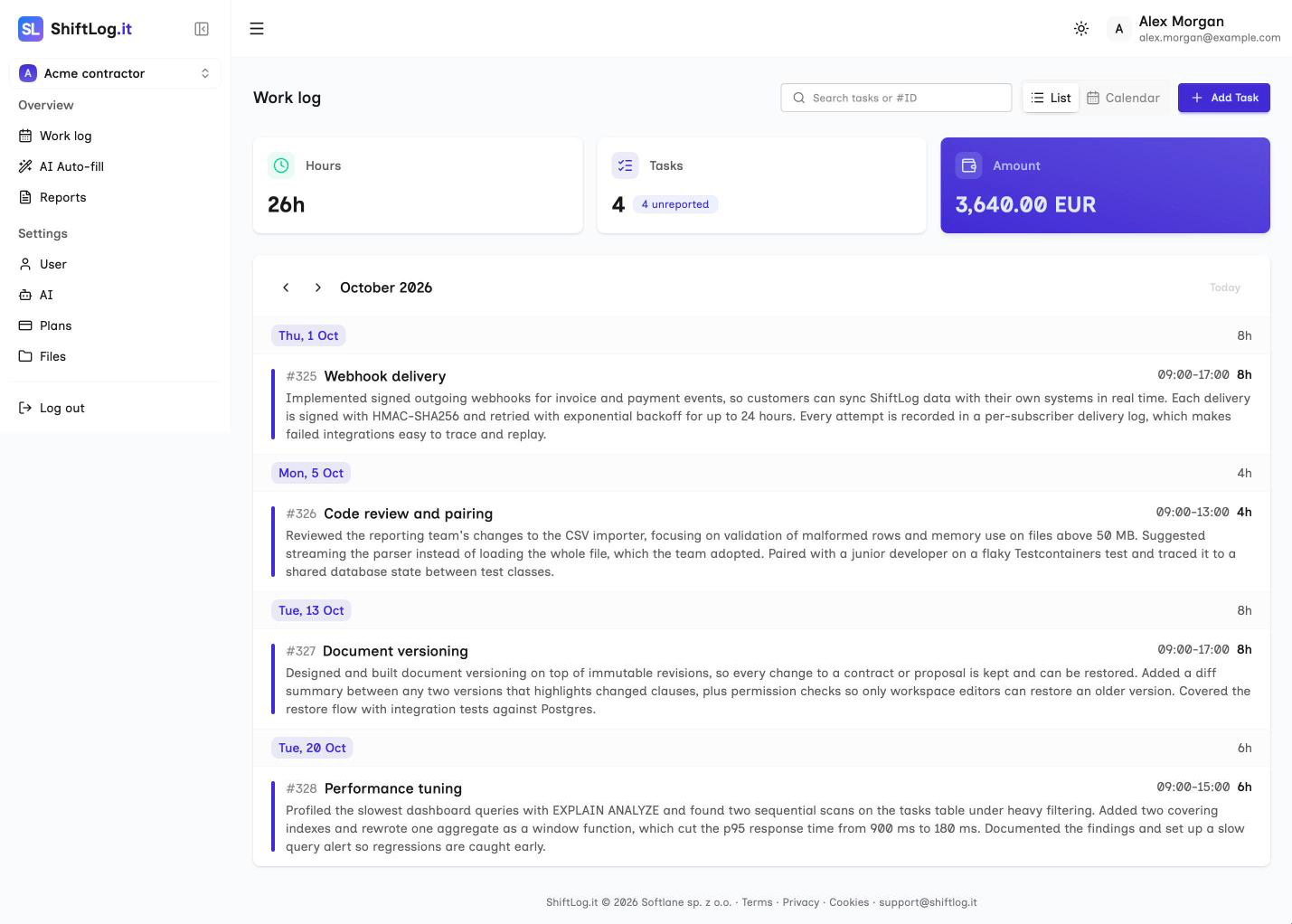
If the month is already over, AI Auto-fill proposes the whole period from one instruction or a pasted git log, for you to review and accept.
When it's time to send the invoice, pick the period on the Reports page and generate the timesheet as a PDF. Paid plans can add their company details at the bottom of the PDF and also get an Excel copy, and every plan gets a CSV for your invoicing or accounting tools. Hours and amounts are added up for you, and each task goes into one timesheet only, so nothing gets billed twice.
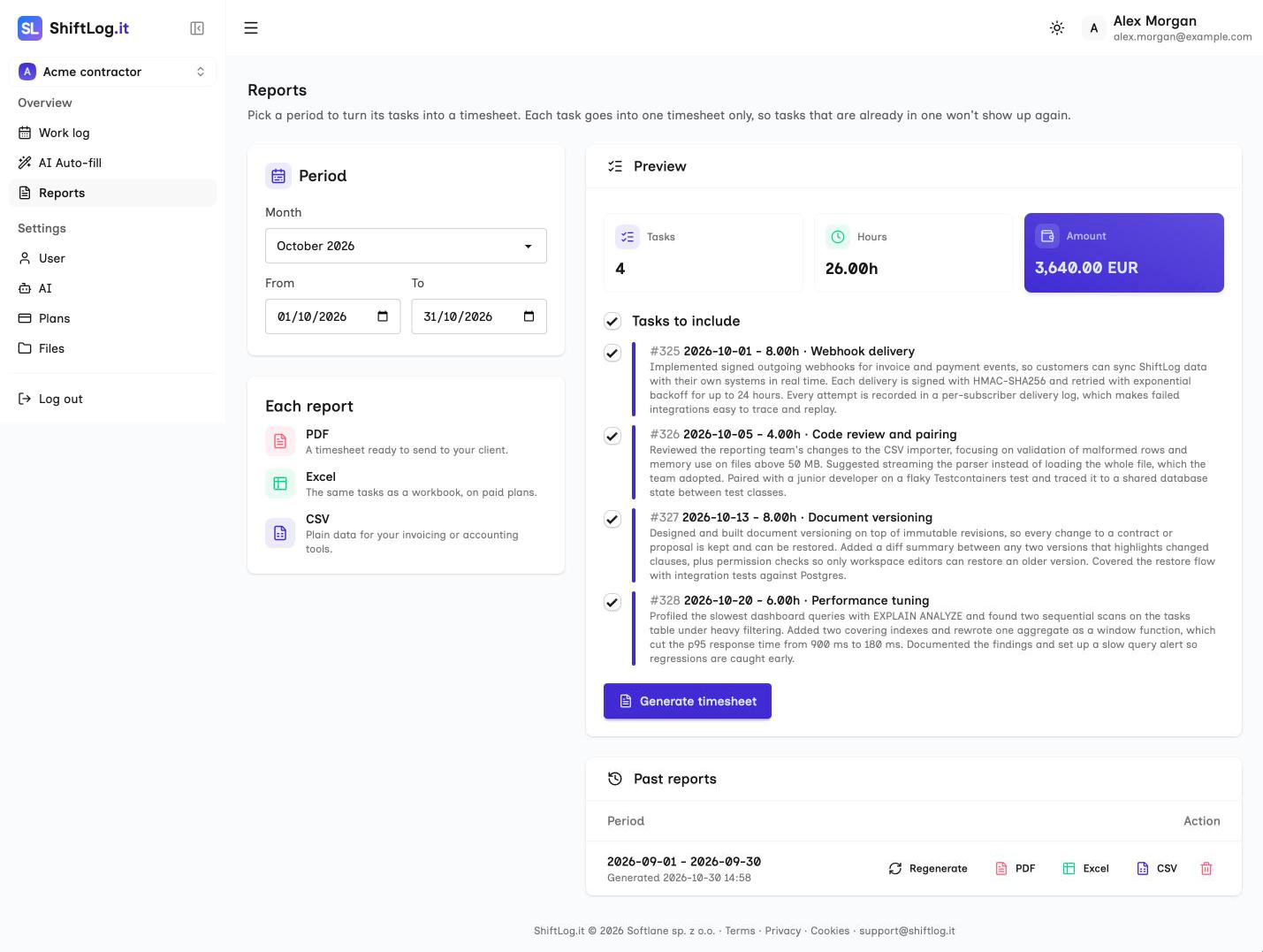
All the AI is optional. You can type every entry yourself on any plan, and the advice above works just as well with a text file and a spreadsheet.
Create a free account and try it on this month's report.
Marcin Milinski
Founder of ShiftLog.it. Writes about logging work, reporting hours to clients and the paperwork of working B2B.