
What AI Auto-fill can do: a month of work log from one sentence
Marcin Milinski · · 5 min read
It's the last day of the month. The invoice is due, and the client wants a work report with it: what you did, day by day, and how many hours each took. You remember roughly what happened. Three days on the payment module, a long code review, a planning session that ran over. What you don't have is the day-by-day version, written up so a client can read it.
That's the gap AI Auto-fill closes. You describe a period the way you'd describe it to a colleague, and you get a proposal for the whole period: one entry per working day, with hours, a title and a description. Nothing is saved until you've looked at it and accepted it.
How it works
On the AI Auto-fill page you pick a period, a month or any range of up to 31 days, and write an instruction. For example:
About 90 hours in November, Tuesdays to Thursdays, 7 hours a day. Mostly the ETA engine and the dashboard, plus planning with the CTO.
Click Generate proposal and, within about twenty seconds, you get a list of rows: a date, the hours, a short title and a description written in the language of your reports.
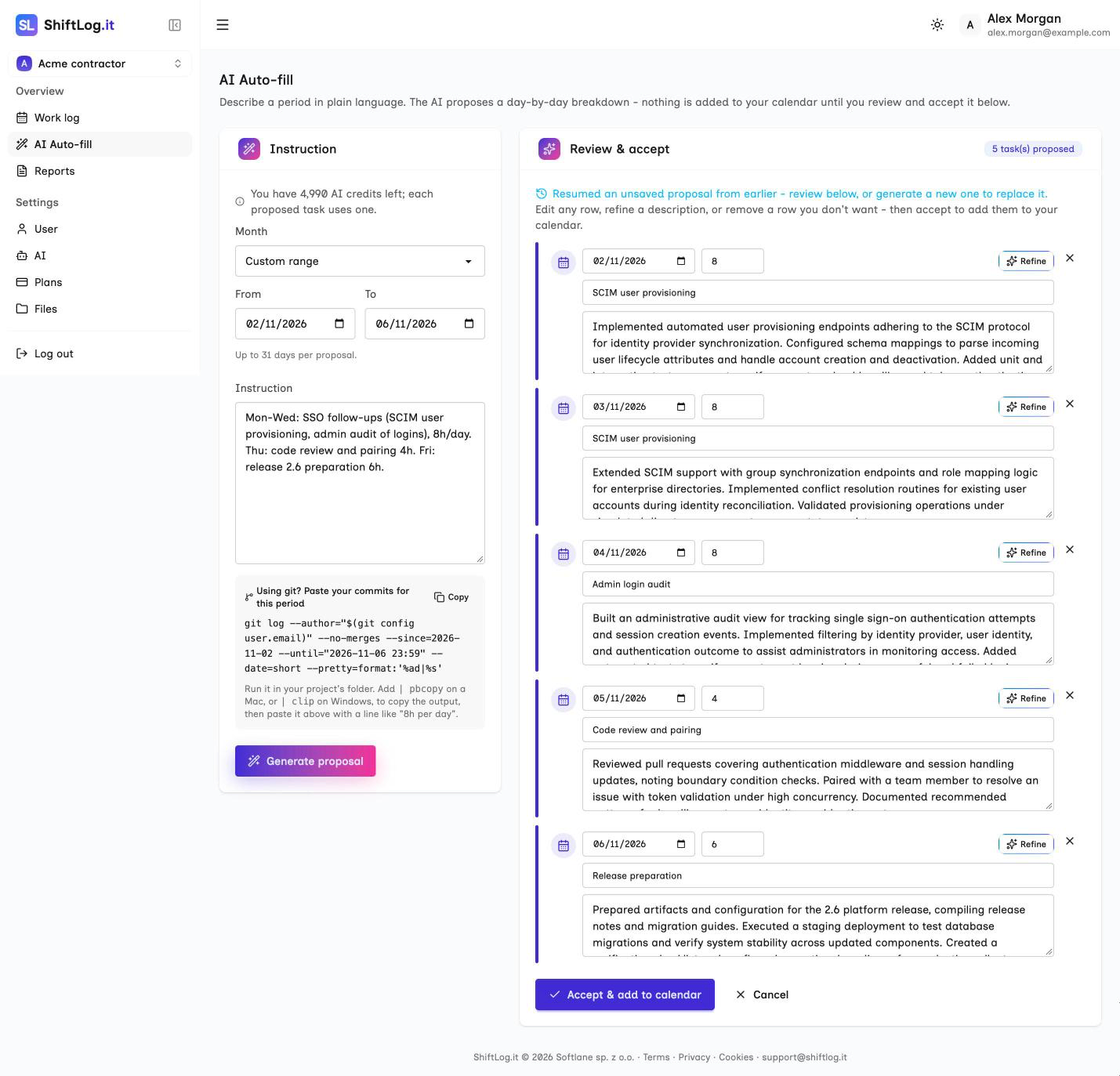
The instruction can be as loose or as precise as you like:
- "Last week: unit tests for the payment module Monday to Wednesday, code review on Thursday, 8 hours a day."
- "32 hours in August, spread over Saturdays and Sundays, 8 hours a day."
- "Split Tuesday into two tasks: the morning on the API migration, the afternoon on the release."
Auto-fill follows the rules you give it. It proposes one task per day unless you ask for more, keeps the hours per day you state, and stays inside the period you picked. If your numbers don't add up, say 6 days at 8 hours in a 5-day week, the period and the hours per day win, and the total comes out lower rather than inflated.
Paste what you already have
You don't have to write the instruction from scratch. Auto-fill takes up to 16,000 characters, enough for a month of notes, so you can paste:
- your own notes from a text file or a notes app,
- an existing report from Google Docs or Excel, if you're moving to ShiftLog.it,
- the output of
git logfor the period.
For software agents, the Auto-fill page shows a ready git log command for the selected dates, limited to your own commits and in a compact format. Copy it, run it in your repository, paste the result, and Auto-fill turns a list of commit messages into a readable account of the work. Commit messages are written for developers; a client report is written for the client, and that translation is the part nobody enjoys doing by hand.
This is also the fastest way to catch up on a month you didn't log at all.
Review, adjust, accept
The proposal is a draft, and you're in charge of it:
- Edit any row directly: the date, the hours, the title, the description.
- Remove a row you don't want.
- Refine a single row by telling the AI what to change, like "mention the staging deploy" or "it was the billing API, not the reports API". Refine rewrites the title too when your change affects it. It's part of the Silver and Gold plans.
- Accept & add to calendar adds every row to your work log in one go.
Until you accept, your work log doesn't change. The proposal is saved as you go, so if you close the tab or your session times out, it's waiting for you on the Auto-fill page next time, and you don't pay for the same proposal twice.
After you accept, the tasks are ordinary entries. You can edit them in the list or the calendar, and they go into your next PDF report like everything else.
It remembers last month
A client who gets a report every month notices when it reads like a fresh start each time: the same project introduced from scratch, the same phrases over and over. Auto-fill reads your recent entries before it writes, so a proposal for November picks up where October left off. A long project reads as one story that moves forward, not twelve copies of the same paragraph.
How far back it looks depends on your plan, and you can set it per agent. Each agent is a separate context for a client or project, with its own business description, history and report language, so entries for different clients never mix.
Where it helps most
- End of the month. One instruction instead of an evening of reconstructing the month from memory.
- Months you didn't log. Paste the git log or your notes and you're up to date in minutes.
- Switching tools. Bring an existing report over without retyping it.
- Steady work. When most weeks look alike, describe the pattern once and adjust the rows that were different.
What it doesn't do is invent work. It writes from what you tell it and from your history, and every row passes through your hands before it's saved. If something in the proposal didn't happen, delete it or change it. The report has your name on it, so it should say what you did.
Plans and credits
Auto-fill is included in the Silver and Gold plans. The Free and Bronze plans include one free run, so you can try it on a real month before deciding. Each proposed task uses one AI credit from your plan's monthly allowance, the same pool as generating and refining descriptions.
If you'd rather type every entry yourself, that works on every plan, with no AI involved. Auto-fill is there for the days when you'd rather not.
Create a free account and try it on this month.
Marcin Milinski
Founder of ShiftLog.it. Writes about logging work, reporting hours to clients and the paperwork of working B2B.